dennyzhang/kubernetes-yaml-templates: Kubernetes Yaml Templates (github.com)
Kubernetes YAML Generator (k8syaml.com)
What is an ‘endpoint’ in Kubernetes? - Stack Overflow
Concepts :
-
Pod : Pods are the smallest deployable units of computing that you can create and manage in Kubernetes
-
Service : An abstract way to expose an application running on a set of Pods as a network service
-
Control Plane :
-
Kube-api-server : expose l’API kubernetes
-
Etcd : stockage clé-valeur de haute disponibilité pour les données du cluster
-
Kube-scheduler : observe les pods nouvellement créés qui n’ont pas de noeud d’affecté et choisit un nœud pour eux
-
Kube-controller-manager : exécute les processus des controller
-
Cloud-controller-manager : The cloud controller manager lets you link your cluster into your cloud provider’s API, and separates out the components that interact with that cloud platform from components that only interact with your cluster
-
-
Node Components :
- Kubelet : agent tournant sur les nœuds en charge de s’assurer que les conteneurs tournent dans un pod.
- Kube-proxy: kube-proxy is a network proxy that runs on each node in your cluster, implementing part of the Kubernetes Service concept.
- Container runtime : docker, containerd
Kubernetes First Pods
List all resource : kubectl get all
List Pods ⇒ kubectl get pods
Your First Pod with Kubect run ⇒ kubectl run my-nginx —image nginx
- kubectl create deployment my-ngninx
- Via ReplicaSet to ensure no downtime (blue/green, canary)
- New replicaSet is created while old replicaSet is being removed
Delete Objects (Pods, Deployment, etc.) ⇒ kubectl delete [pod/deployment] my-nginx
-
kubectl scale deploy/my-apache —replicas 2
-
kubectl scale deploy my-apache —replicas 2
-
Deploy = deployment = deployments
-
Container logs : kubectl logs deployment/my-apache [—folow] [—tail 1]
-
Get more details about an object including events : kubectl describe pod/my-apache-6f45bc5bd9-8wjt9
-
Details
-
ClusterIP
-
ClusterIP is the default and most common service type.
-
Kubernetes will assign a cluster-internal IP address to ClusterIP service. This makes the service only reachable within the cluster.
-
You cannot make requests to service (pods) from outside the cluster. You can optionally set cluster IP in the service definition file.
-
Use Cases
- Inter-service communication within the cluster. For example, communication between the front-end and back-end components of your app.
-
-
NodePort
-
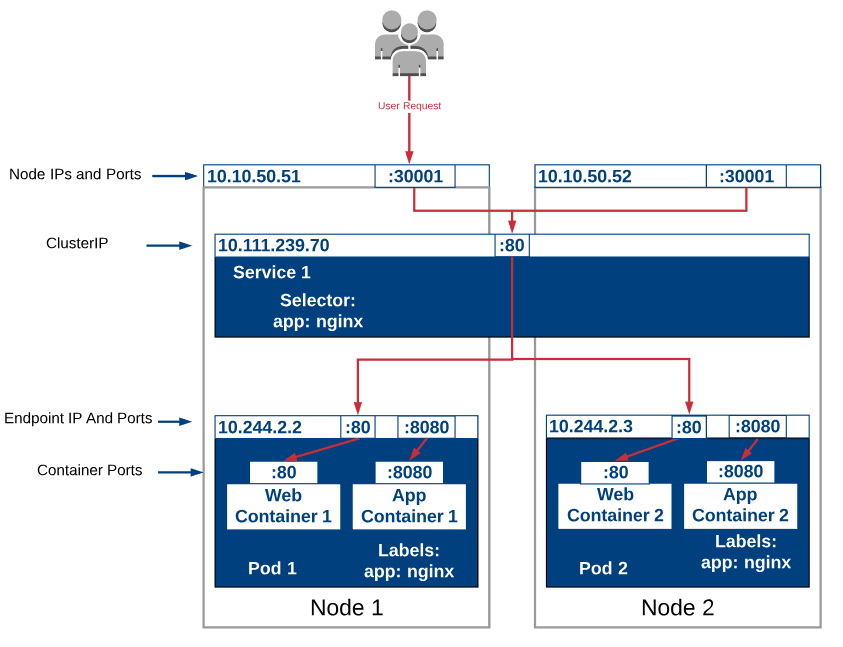
NodePort service is an extension of ClusterIP service. A ClusterIP Service, to which the NodePort Service routes, is automatically created.
-
It exposes the service outside of the cluster by adding a cluster-wide port on top of ClusterIP.
-
NodePort exposes the service on each Node’s IP at a static port (the NodePort). Each node proxies that port into your Service. So, external traffic has access to fixed port on each Node. It means any request to your cluster on that port gets forwarded to the service.
-
You can contact the NodePort Service, from outside the cluster, by requesting :.
-
Node port must be in the range of 30000–32767. Manually allocating a port to the service is optional. If it is undefined, Kubernetes will automatically assign one.
-
If you are going to choose node port explicitly, ensure that the port was not already used by another service.
-
Use Cases
- When you want to enable external connectivity to your service. Using a NodePort gives you the freedom to set up your own load balancing solution, to configure environments that are not fully supported by
- Kubernetes, or even to expose one or more nodes’ IPs directly. Prefer to place a load balancer above your nodes to avoid node failure.
-
-
LoadBalancer
-
LoadBalancer service is an extension of NodePort service. NodePort and ClusterIP Services, to which the external load balancer routes, are automatically created.
-
It integrates NodePort with cloud-based load balancers.
-
It exposes the Service externally using a cloud provider’s load balancer.
-
Each cloud provider (AWS, Azure, GCP, etc) has its own native load balancer implementation. The cloud provider will create a load balancer, which then automatically routes requests to your Kubernetes Service.
-
Traffic from the external load balancer is directed at the backend Pods. The cloud provider decides how it is load balanced.
-
The actual creation of the load balancer happens asynchronously.
-
Every time you want to expose a service to the outside world, you have to create a new LoadBalancer and get an IP address.
-
Use Cases
- When you are using a cloud provider to host your Kubernetes cluster.
-
-
ExternalName
-
Services of type ExternalName map a Service to a DNS name, not to a typical selector such as my-service.
-
You specify these Services with the spec.externalName parameter. It maps the Service to the contents of the externalName field (e.g. foo.bar.example.com), by returning a CNAME record with its value.
-
No proxying of any kind is established.
-
Use Cases
- This is commonly used to create a service within Kubernetes to represent an external datastore like a database that runs externally to Kubernetes.
- You can use that ExternalName service (as a local service) when Pods from one namespace talk to a service in another namespace.
-
-
Components :
Kubernetes First Pods
First deployment with kubectl ⇒
Scale deployments :
Inspecting Kubernetes objects logs ⇒